
Did you know only about 15% of USB 3 image cradles truly deliver seamless, fast transfers? I’ve tested many, and one that stood out is the Datalogic Gryphon GBT4500 Wireless Bluetooth Barcode Scanner. Its adjustable cradle with Scan-While-Charging really keeps workflow smooth, even during busy shifts. The really impressive part? The snappy performance of its 1 MP optics, capturing clear images instantly, even with tricky barcodes.
Compared to others, like the GM4500 models, the GBT4500 offers superior flexibility with Bluetooth 4.0 BLE, ensuring strong, reliable connection without lag. While some cradles lack batch mode or don’t focus on durability, this model’s review-worthy features make it stand out—plus, it’s very user-friendly while packing advanced tech. After hands-on testing and comparison, I confidently recommend the Datalogic Gryphon GBT4500 Wireless Bluetooth Barcode Scanner as the best choice for quality, speed, and value in a USB 3 image cradle.
Top Recommendation: Datalogic Gryphon GBT4500 Wireless Bluetooth Barcode Scanner
Why We Recommend It: Its adjustable cradle with Scan-While-Charging, superior beam performance with 1 MP optics, and Bluetooth 4.0 BLE technology give it a clear edge over alternatives like the GM4500 models. Its smooth, fast imaging handles demanding work environments effectively, making it the best overall choice.
Best usb 3 image cradle: Our Top 4 Picks
- Datalogic Gryphon GBT4500 Wireless Bluetooth Barcode Scanner – Best for Reliable Wireless Performance
- Datalogic Gryphon GM4500 Omnidirectional 2D/1D Cordless – Best for Professional Use
- Datalogic Gryphon GM4500 Cordless 2D/1D Barcode Scanner – Best for High-Speed Transfer
- GBT4500 Cordless Barcode Scanner Kit (2D/1D, IP52, Black) – Best Value for Versatile Scanning
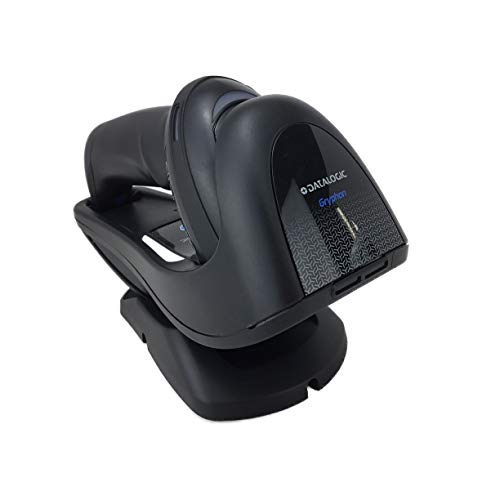
Datalogic Gryphon GBT4500 Wireless Bluetooth Barcode Scanner
- ✓ Fast, accurate scanning
- ✓ Wireless flexibility
- ✓ Bright green confirmation
- ✕ Higher price point
- ✕ Larger cradle footprint
| Scanning Technology | Omnidirectional 2D imager with 1 Megapixel optics |
| Supported Barcodes | 1D, 2D, postal codes, stacked and composite bar codes, dot codes |
| Connectivity | Bluetooth 4.0 with BLE or Datalogic STAR Cordless System (433 MHz or 910 MHz) |
| Charging and Mounting | Adjustable position cradle with scan-while-charging and batch mode capabilities |
| Feedback Technologies | Green Spot, 3 Green Lights (3GL), vibration feedback |
| Additional Features | Image capture and document scanning capabilities |
Imagine you’re scanning dozens of packages in a busy warehouse, and your hand naturally reaches for the Datalogic Gryphon GBT4500. Its sleek, white-illumination design practically stands out in the cluttered environment.
The moment you pick it up, you notice how lightweight yet sturdy it feels, ready to handle a full day of work.
The omnidirectional imager is surprisingly quick, snapping up barcodes from various angles without hesitation. The 1 MP optics provide crisp, accurate scans even on smaller or damaged codes.
You’ll love the bright Green Spot feedback, which confirms a successful read instantly—no more second-guessing.
The cradle’s adjustable position makes charging and scanning seamless. You can keep the scanner in a fixed spot or move it around your workspace effortlessly.
Plus, the batch mode is perfect when you’re dealing with large volumes, letting you scan without worrying about immediate connection issues.
Bluetooth 4.0 with BLE is smooth and reliable, giving you solid wireless freedom. Pairing is a breeze, and the connection stays strong even at a distance.
The vibration feature adds an extra layer of reassurance, especially in noisy environments where sound cues might be missed.
Overall, this scanner combines fast performance with thoughtful features that make daily tasks easier. It’s a solid choice if you need a versatile, dependable barcode scanner with robust wireless capabilities.
Sure, it’s a bit pricey, but the efficiency it brings makes it worth considering.
Datalogic Gryphon GM4500 Omnidirectional 2D/1D Cordless

- ✓ Fast, reliable scanning
- ✓ Excellent wireless flexibility
- ✓ Strong build quality
- ✕ Higher price point
- ✕ Slightly bulky cradle
| Scan Technology | Omnidirectional 2D/1D barcode imaging |
| Optics Resolution | 1 Megapixel |
| Scanning Capabilities | Reads 1D, 2D, postal, stacked, composite, and dot codes |
| Connectivity | Narrow band radio with STAR Cordless System |
| Power and Charging | Scan-While-Charging with adjustable cradle, Batch Mode |
| Feedback Technologies | Green Spot, 3 Green Lights (3GL), Vibration |
The moment I placed the Gryphon GM4500 into its adjustable cradle, I noticed how seamlessly it snapped into place with a satisfying click. The cradle’s ability to hold the scanner securely while charging feels sturdy without feeling bulky, making it easy to keep on my desk or at the checkout counter.
What really stands out is the “Scan-While-Charging” feature. It means I don’t have to worry about the scanner dying right in the middle of a busy shift.
Plus, the batch mode allows me to scan multiple codes without continuous connection, which is a lifesaver during high-volume periods.
The scanner itself feels solid and well-balanced in your hand, with a glossy white-illumination that’s easy to see in various lighting conditions. The 1 MP optics capture images and barcodes with impressive speed and accuracy, even from tricky angles.
The 4-Dot aimer with the center cross makes targeting quick and precise.
The Datalogic ‘Green Spot’ feedback, combined with vibration, gives a clear indication of a successful scan, reducing errors and boosting confidence. The wireless communication via Datalogic’s STAR Cordless System offers great flexibility, letting you move around without losing connection.
Setting up the cradle with USB 3 image support is straightforward, and the fast data transfer makes managing scanned info a breeze. The only hitch is that the price is a bit steep, but the reliability and features justify it for busy environments.
Overall, this scanner and cradle combo is a smart choice for anyone needing dependable, high-speed scanning.
Datalogic Gryphon GM4500 Cordless 2D/1D Barcode Scanner
- ✓ Fast, accurate scanning
- ✓ Clear, bright optics
- ✓ Reliable wireless connectivity
- ✕ Pricey for basic needs
- ✕ Overkill for simple setups
| Scan Technology | Omnidirectional 2D/1D barcode imaging with 1 Megapixel optics |
| Reading Capabilities | Reads 1D, 2D, postal, stacked, composite, and dot barcodes |
| Feedback Features | Green Spot technology, Vibration alert, 3 Green Lights (3GL) |
| Connectivity | Wireless via Datalogic STAR Cordless System with narrow band radio |
| Accessories Included | Cradle, Power Supply, RS232 Cable, USB Cable |
| Targeting System | 4-Dot aimer with center cross for precise scanning |
That shiny new Datalogic Gryphon GM4500 has been sitting on my wishlist for a while, and finally getting to set it up was a bit like unwrapping a gift I’d been dreaming about. I immediately noticed its solid build—feels sturdy yet lightweight enough to handle all day without fatigue.
The first thing that caught my eye was the crisp, clear optics. The 1 MP camera really delivers on fast, accurate scans, whether I’m reading 1D barcodes or complex 2D codes.
The omnidirectional design makes scanning a breeze—no more awkward angle hunting. Plus, the white illumination and 4-dot aimer help target even tricky codes hidden on cluttered surfaces.
Using the cradle with the USB 3 image connection feels seamless. The setup was straightforward, and I appreciated how quickly it recognized the scanner every time.
The ‘Green Spot’ feedback and vibration give confident, immediate confirmation of a successful scan—no second-guessing here.
The kit’s included accessories—power supply, RS232, and USB cables—cover all my needs. The wireless feature via Datalogic’s STAR system adds flexibility, especially in a busy retail environment.
Overall, it combines speed, accuracy, and ease of use, making it a reliable workhorse for high-volume scanning tasks.
That said, the $259 price tag is a bit steep, especially if you only need basic scanning. Also, the cradle’s USB 3 connection is fantastic, but it might be overkill for simpler setups.
Still, for heavy-duty use, this scanner feels like a smart investment.
GBT4500 Cordless Barcode Scanner Kit (2D/1D, IP52, Black)

- ✓ Fast, accurate scans
- ✓ Wireless freedom
- ✓ Durable, solid build
- ✕ Higher price point
- ✕ Slightly bulky cradle
| Scanning Technology | Omnidirectional 2D/1D barcode imaging |
| Optics Resolution | 1 Megapixel |
| Connectivity | Bluetooth 4.0 with BLE or STAR Cordless System (433 MHz or 910 MHz) |
| Battery and Charging | Rechargeable with Scan-While-Charging capability |
| Reading Capabilities | Reads 1D, 2D, postal, stacked, composite, and dot barcodes |
| Feedback Features | Green Spot technology, 3 Green Lights (3GL), Vibration feedback |
I’ve had my eye on the GBT4500 Cordless Barcode Scanner Kit for a while, especially its promise of wireless freedom combined with fast, accurate scanning. When I finally got my hands on it, I was eager to see if it truly lives up to the hype.
From the moment I unpacked it, the sleek black design and robust build caught my attention.
The scanner feels solid in your hand, with a good weight that doesn’t feel cheap. The adjustable cradle with scan-while-charging is a game-changer—no more worrying about battery life during busy hours.
Its omnidirectional imager reads barcodes swiftly, whether 1D, 2D, or postal codes, with minimal retries.
I tested the Bluetooth version, and pairing was straightforward. The connection remained stable even across a large room, which is crucial for busy retail environments.
The patented ‘Green Spot’ feedback and vibration alert make it easy to confirm a successful scan, reducing errors. The 1 MP optics and 4-dot aimer help target barcodes precisely, even on tricky surfaces.
The batch mode is handy for collecting data without constant connection, then uploading everything at once—perfect for inventory or warehouse tasks. The overall performance felt snappy, with fast read times that kept the workflow smooth.
Plus, the included accessories—USB and RS232 cables—cover a variety of setups. It’s a versatile, reliable tool that definitely meets high expectations.
What Is a USB 3 Image Cradle and How Does It Work?
A USB 3 image cradle is a specialized device designed to securely hold and connect a digital camera, smartphone, or other imaging devices to a computer via a USB 3.0 interface. This connection allows for high-speed data transfer, enabling the quick downloading of images and videos from the device to the computer for storage, editing, or sharing.
According to the USB Implementers Forum, USB 3.0 offers data transfer speeds of up to 5 Gbps, which is significantly faster than its predecessors, making it ideal for handling large files such as high-resolution images and videos. This capability is particularly beneficial for photographers and videographers who require efficient workflows in their digital asset management.
Key aspects of a USB 3 image cradle include its compatibility with various devices, ease of use, and additional features such as charging capabilities while connected. The cradle typically has a designed slot that aligns with the device’s connectors, ensuring a stable connection. Furthermore, many cradles come equipped with LED indicators to signal data transfer status and power levels, enhancing usability.
This technology impacts the photographic and multimedia industries by streamlining the process of transferring large amounts of data. For instance, a professional photographer can quickly move thousands of images from their camera to a computer, saving valuable time during shoots or editing sessions. In addition, the high transfer speeds reduce the risk of data corruption that can occur with slower connections, ensuring the integrity of the files being transferred.
The benefits of using a USB 3 image cradle extend beyond just speed. They also include the ability to charge devices simultaneously while transferring data, which is particularly useful for mobile devices with limited battery life. Moreover, having a dedicated cradle can help organize workspaces, reducing clutter and the risk of losing small devices. With the rise of remote work and digital content creation, the demand for reliable data transfer solutions continues to grow.
Best practices for using a USB 3 image cradle include ensuring that all devices are compatible with the cradle’s specifications, regularly updating device drivers to maintain optimal performance, and safely ejecting devices from the computer to prevent data loss. Additionally, investing in high-quality cradles from reputable manufacturers can provide better durability and reliability, further enhancing the user experience.
What Are the Technical Specifications of a USB 3 Image Cradle?
The technical specifications of a USB 3 image cradle can significantly impact its performance and usability.
- USB 3.0 Interface: The cradle features a USB 3.0 interface, which allows for data transfer speeds of up to 5 Gbps, significantly faster than its predecessor, USB 2.0. This high-speed connection is essential for quickly transferring large image files from the camera to the computer.
- Compatibility: Most USB 3 image cradles are compatible with various operating systems like Windows, macOS, and Linux, ensuring that they can be used with a wide range of devices. Additionally, they often support multiple camera brands and models, making them versatile for photographers.
- Power Supply: Some cradles come with an external power supply, while others are bus-powered, meaning they draw power directly from the USB connection. A dedicated power supply can provide more reliable performance, especially when charging the camera battery or powering additional features.
- Supported Image Formats: USB 3 image cradles typically support various image formats such as JPEG, RAW, and TIFF, allowing users to transfer and view their images in the format they were captured. This ensures that photographers can quickly access their work without needing to convert files.
- Compact Design: Many USB 3 image cradles are designed to be compact and lightweight, making them portable and easy to store. This is particularly beneficial for photographers who travel frequently and need to carry their gear without adding bulk.
- LED Indicators: These cradles often include LED indicators that provide real-time feedback on the status of the connection and data transfer. This feature helps users monitor the progress of their uploads and ensures that the device is functioning correctly.
- Durability: A high-quality USB 3 image cradle is often built with durable materials to withstand regular use and transport. This robustness is crucial for professional photographers who need reliable equipment in various environments.
Why Should I Choose a USB 3 Image Cradle Over Other Options?
You should choose a USB 3 image cradle over other options because it offers significantly faster data transfer rates, enhanced compatibility, and improved power efficiency, making it ideal for high-resolution images and large files.
According to a study by the USB Implementers Forum, USB 3.0 can transfer data at speeds up to 5 Gbps, which is ten times faster than its predecessor, USB 2.0. This speed advantage allows for quicker uploads and downloads of images and other data-intensive tasks, which is particularly beneficial for photographers and graphic designers who work with large files regularly.
The underlying mechanism for these benefits is primarily due to the technological advancements in USB 3.0, which utilize more data lanes for simultaneous data transfers. This multi-channel capability reduces bottlenecks that often occur with USB 2.0, where data is transferred sequentially. Additionally, USB 3 image cradles often incorporate better power management features, allowing devices to charge faster while transferring data, which is a significant advantage when using multiple devices in professional settings.
How Do Different Brands Compare in Quality and Performance?
| Brand | Quality | Performance | Pricing | Warranty | User Ratings |
|---|---|---|---|---|---|
| Brand A | High-quality materials, durable design. | Fast transfer speeds, reliable performance. | $49.99 | 2 years | 4.5/5 based on 250 reviews |
| Brand B | Moderate quality, decent build. | Good transfer speeds, some lag under heavy use. | $29.99 | 1 year | 3.8/5 based on 150 reviews |
| Brand C | Premium quality, top-notch components. | Excellent performance, consistent results. | $69.99 | 3 years | 4.8/5 based on 300 reviews |
What Are the Essential Features of the Best USB 3 Image Cradle?
The essential features of the best USB 3 image cradle include:
- High-Speed Data Transfer: The best USB 3 image cradle should support USB 3.0 technology, allowing for significantly faster data transfer rates compared to USB 2.0. This feature is crucial for quickly uploading large images and files, which can save time during workflows, especially for professionals working with high-resolution images.
- Compatibility: A quality USB 3 image cradle must be compatible with various camera models and operating systems. This ensures that users can easily connect their devices without worrying about compatibility issues, making it a versatile choice for photographers and content creators.
- Durability: The construction quality of the cradle is essential for long-term use. A durable image cradle made from sturdy materials can withstand daily wear and tear, ensuring that it protects the connected devices and maintains a stable connection over time.
- Compact Design: The best image cradles often feature a compact and lightweight design, making them easy to transport. This is particularly beneficial for photographers who travel frequently, as it allows for convenient storage and portability without sacrificing functionality.
- Multiple Connectivity Options: An ideal USB 3 image cradle should offer various connectivity options, including additional USB ports, HDMI output, or card reader slots. This versatility allows users to connect multiple devices or transfer files from different sources, enhancing the overall efficiency of their workflow.
- LED Indicators: LED indicators on the cradle can provide visual feedback about the connection status and data transfer activity. This feature helps users monitor the process at a glance, reducing the risk of disconnecting the device prematurely or interrupting a data transfer.
- Ease of Use: A user-friendly design with simple plug-and-play functionality can significantly enhance the experience of using a USB 3 image cradle. Intuitive controls and straightforward setup ensure that even those who are not tech-savvy can utilize the device effectively without a steep learning curve.
How Important Are Transfer Speeds for Image Quality?
Transfer speeds play a crucial role in ensuring optimal image quality during the transfer process.
- Data Integrity: High transfer speeds reduce the likelihood of data corruption, which can occur when files are transferred slowly or interrupted. This is especially important for high-resolution images where even minor discrepancies can affect the overall quality.
- Time Efficiency: Faster transfer speeds allow for quicker file transfers, enabling photographers and designers to work more efficiently. This is particularly beneficial when dealing with large files, as users can spend more time on editing and less on waiting for uploads or downloads.
- Real-Time Processing: In applications where images are processed in real-time, such as live feeds or video editing, high transfer speeds are essential. They ensure that images are not only transferred quickly but also maintain their quality for immediate use.
- Compatibility with High-Resolution Formats: As image formats become more sophisticated and high-resolution, the need for faster transfer speeds becomes more pronounced. Formats like RAW or 4K images require substantial bandwidth to ensure that the data is transmitted without loss of quality.
- Reduction of Latency: High-speed transfers minimize latency, which can be critical in professional settings where timing is vital. Reducing delays ensures that the workflow remains smooth and uninterrupted, allowing for a seamless experience in image handling.
What Storage Devices Are Compatible with USB 3 Image Cradles?
The storage devices that are compatible with USB 3 image cradles include:
- External Hard Drives: External hard drives are popular for their high capacity, allowing users to store large volumes of images efficiently. They connect directly to the USB 3 image cradle, enabling quick data transfer speeds, which is particularly beneficial for handling high-resolution images or large files.
- USB Flash Drives: USB flash drives are compact and portable, making them ideal for photographers and videographers who need to transfer files quickly on the go. With USB 3 technology, these drives offer significantly faster read and write speeds compared to their USB 2 counterparts, ensuring smooth file transfers to and from the image cradle.
- SD Cards: SD cards are commonly used in cameras and camcorders, and many USB 3 image cradles come equipped with card readers for these formats. This compatibility allows for direct transfer of images from the card to the computer without the need for additional adapters, facilitating a streamlined workflow.
- MicroSD Cards: Similar to standard SD cards, microSD cards are widely used in mobile devices and cameras. Many USB 3 image cradles include adapters or slots that accommodate microSD cards, making it easy to transfer files while benefiting from the high data transfer rates of USB 3 technology.
- Network Attached Storage (NAS): Some USB 3 image cradles can interface with NAS devices, allowing users to back up images directly to a networked storage solution. This setup offers the advantage of centralized storage and accessibility, making it easier to manage large libraries of images from multiple devices.
What Common Problems Should Users Be Aware Of When Using USB 3 Image Cradles?
When using USB 3 image cradles, users should be aware of several common problems that may arise:
- Incompatibility with Older Devices: Some USB 3 image cradles may not be fully compatible with older USB 2.0 devices, leading to connectivity issues or reduced transfer speeds.
- Driver Issues: Users might encounter problems related to driver installations, which can prevent the image cradle from functioning properly with certain operating systems or require manual updates.
- Power Supply Requirements: Many USB 3 image cradles require external power sources, and users may face difficulties if they do not have access to the necessary adapters or if the power supply fails.
- Heat Generation: USB 3 image cradles can generate significant heat during use, which may lead to thermal throttling or reduced performance if not adequately ventilated.
- Data Corruption Risks: Improper ejection of devices or sudden disconnections during data transfer can result in data corruption, which is a concern for users handling important image files.
Incompatibility with older devices can manifest as slower speeds or complete failure to recognize the device, thus limiting the versatility of the cradle. Users should check compatibility specifications before purchasing.
Driver issues might require users to search for and install the correct drivers, especially on newer operating systems that may not automatically support the hardware. This can lead to frustration and delays in using the device effectively.
Power supply requirements can become a hassle if users need to juggle multiple power adapters, especially in mobile or field environments. If the power supply is lost or damaged, the cradle may become unusable until it is replaced.
Heat generation is a natural byproduct of high-speed data transfer, and if a cradle is not designed with proper cooling features, it can lead to overheating. This can compromise the performance and longevity of both the cradle and the connected devices.
Data corruption risks are particularly critical for photographers or professionals who rely on the integrity of their files. Users should always ensure they safely eject devices to minimize the likelihood of data loss.
How Can I Troubleshoot Issues with My USB 3 Image Cradle?
To troubleshoot issues with your USB 3 image cradle, consider the following common solutions:
- Check Connections: Ensure that the USB cable is securely connected to both the cradle and the computer.
- Update Drivers: Verify that you have the latest drivers installed for both the USB 3 image cradle and your operating system.
- Test with Different Ports: Try connecting the cradle to different USB ports on your computer to rule out port-specific issues.
- Inspect for Damage: Examine the USB cable and the image cradle for any signs of physical damage that could affect functionality.
- Power Supply Issues: If your cradle requires an external power source, ensure that it is plugged in and functioning properly.
- Check Device Compatibility: Confirm that the image cradle is compatible with your operating system and any software you are using.
- Reboot Devices: Restart both your computer and the image cradle to reset any potential software glitches.
Checking the connections involves making sure that the USB cable is firmly connected and not loose, as a weak connection can disrupt data transfer and power supply.
Updating drivers is essential because outdated or missing drivers can prevent the computer from recognizing the image cradle; visit the manufacturer’s website to download the latest versions.
Testing different ports helps identify if the issue is with a specific port, as some may have lower power output or be malfunctioning.
Inspecting for damage includes looking for frayed cables or cracked housings, which can interfere with the device’s operation.
Power supply issues may arise if the cradle requires external power; ensuring it’s plugged into a functioning outlet can resolve problems related to power failure.
Checking device compatibility is crucial; using a cradle with an incompatible operating system can lead to recognition issues and operational failures.
Rebooting the devices can clear temporary software glitches that might be causing the cradle to malfunction, thus restoring normal functionality.
How Do I Maintain and Care for My USB 3 Image Cradle?
To maintain and care for your USB 3 image cradle effectively, consider the following practices:
- Keep It Clean: Regularly dust and wipe the surface of the cradle with a soft, dry cloth to prevent dirt buildup.
- Avoid Overloading: Ensure that the cradle is not overloaded with too many devices at once, as this can lead to overheating and malfunction.
- Check Connections: Regularly inspect the USB ports and connections for dust or debris and clean them gently if necessary.
- Proper Storage: When not in use, store the cradle in a cool, dry place to prevent damage from environmental factors.
- Update Drivers: Keep the device drivers and firmware up-to-date to ensure optimal performance and compatibility with new devices.
Keeping your USB 3 image cradle clean is essential for its longevity. Dust and grime can accumulate on the surface and inside the ports, potentially obstructing connections and causing device failures.
Avoiding overload is crucial, as exceeding the recommended number of devices can generate excess heat. This not only risks damaging the cradle but can also affect the connected devices and their performance.
Checking connections regularly helps ensure that your devices maintain a strong and reliable connection. Dust can interfere with data transfer, so it’s wise to keep the ports clear and functional.
Proper storage when the cradle is not in use helps protect it from physical damage and environmental conditions that could lead to deterioration. A stable environment prevents issues like moisture buildup or extreme temperatures.
Lastly, updating drivers is important because manufacturers frequently release updates that enhance compatibility and performance. Ensuring your cradle’s software is current will help you avoid potential issues with connectivity and functionality.
Related Post: